
IPTV World Cup 2026 Guide
Watch the 2026 World Cup without match-day panic.
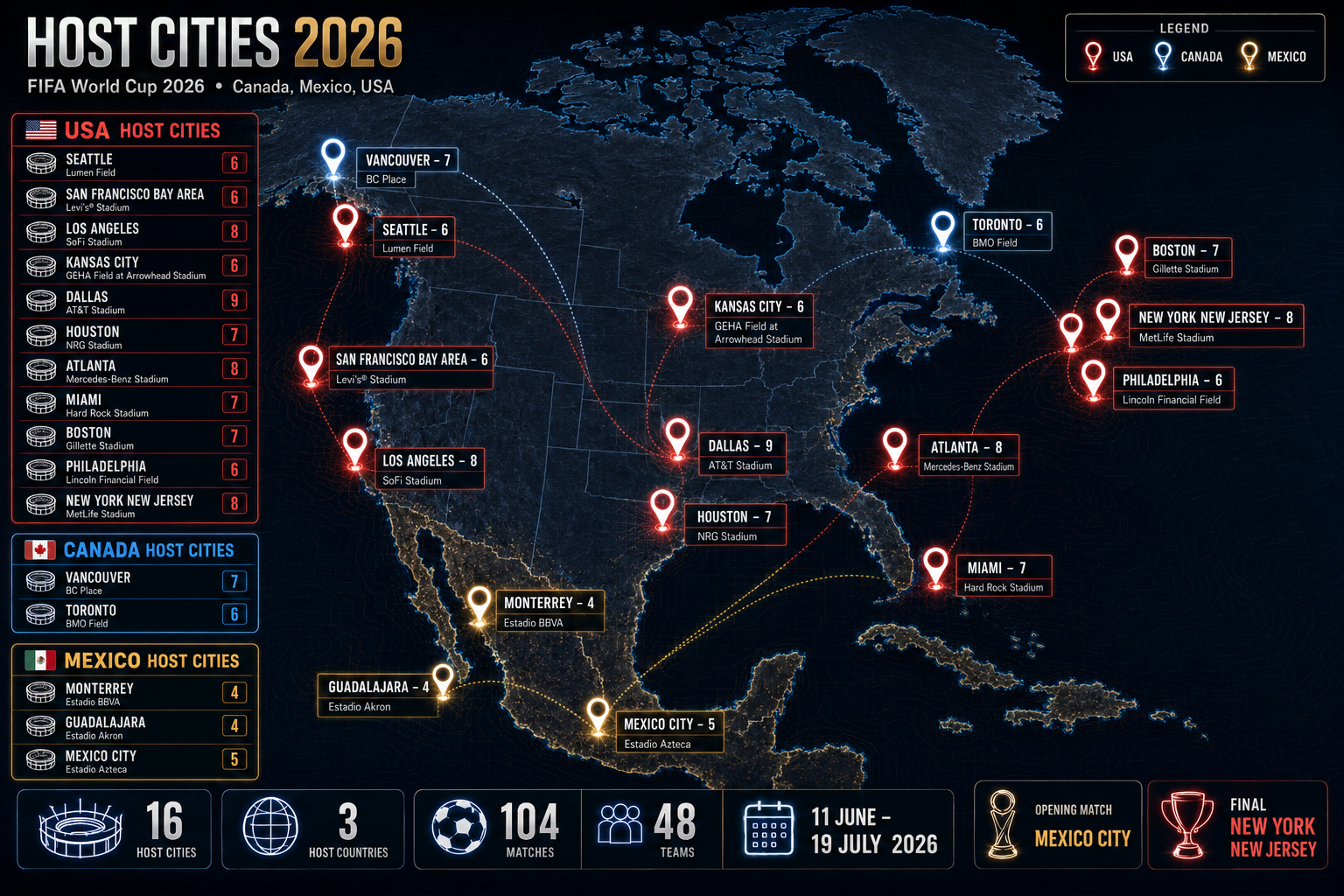
The biggest FIFA World Cup ever is almost here: 48 teams, 104 matches, three host countries, and 16 host cities. Use this guide to prepare your IPTV setup, test M3U or Xtream Codes, choose the right device, and stream every licensed broadcast channel you have access to before the opening whistle.
New for WC 2026
The tournament is larger, longer, and harder to follow on one channel.
World Cup 2026 spans North America, adds a Round of 32, and runs across multiple time zones. That makes IPTV preparation more important than waiting until match day.
The tournament opens in Mexico City and ends with the final in New York New Jersey.
The first 48-team World Cup means more group games, more overlap, and more channels to check.
The top two from each group and the eight best third-place teams advance to the Round of 32.
Sixteen host cities stage matches across three countries and several broadcast markets.
Mexico vs South Africa at Mexico City Stadium.
Multiple daily matches across the USA, Canada, and Mexico.
A new Round of 32 raises the pressure and the number of must-watch games.
The champion is crowned at New York New Jersey Stadium.
IPTV World Cup 2026
What does IPTV mean for World Cup viewing?
IPTV stands for Internet Protocol Television. Instead of relying on a satellite dish or cable box, your live TV channels are delivered through an internet connection and opened inside an IPTV player app.
For World Cup 2026, that matters because fans will switch between national broadcasters, language feeds, sports channels, and different match windows. With the right subscription and app, you can watch on Smart TV, Fire TV Stick, Android TV, phone, tablet, laptop, or PC.
Limited devices, cable boxes, fixed bundles, country restrictions, and fewer ways to switch between simultaneous matches.
M3U Playlist or Xtream Codes access, multi-device setup, sports channel categories, and flexible viewing when you travel.
Why fans prepare early
One bad setup can ruin the one match you waited four years to see.
The best time to test IPTV for World Cup 2026 is before the stadium lights come on. Login errors, app crashes, weak Wi-Fi, expired playlists, and missing channels are all fixable when you find them early.
Switch between broadcasters
Move between sports channels and language feeds when two matches are live at the same time.
Watch on the screen you prefer
Set up Smart TV for the living room, phone for travel, and PC for work breaks or second-screen viewing.
Test match-day stability
Run a 24H test during a live sports event to check stream quality, app behavior, and internet speed.
Keep backup options ready
Know which app, channel category, or official broadcaster app you can use if your first stream fails.
Provider comparison
Choose your IPTV provider by match-day behavior, not by price alone.
A low price means little if the stream drops during extra time. Prioritize live sports capacity, M3U and Xtream support, fast support, and verified access to the channels you want to watch legally in your country.
| Provider | Stream quality | Sports coverage | M3U | Xtream Codes | Trial |
|---|---|---|---|---|---|
| M3UXtream | HD, FHD, 4K, selected 8K-ready channels where available | 300+ sports channels listed | Yes | Yes | 24H test |
| Generic Provider B | FHD | Smaller channel list | Yes | Varies | Often no trial |
| Generic Provider C | HD only | Limited sports depth | Yes | No | Short test only |
Test your exact device, exact IPTV app, and exact internet connection before the opening match. If it works only on your phone, it is not ready for your main TV.
Setup plan
From subscription to kickoff in five clear steps.
This is the setup flow most fans need for World Cup 2026, whether they use a Smart TV, Fire TV Stick, Android TV box, phone, tablet, PC, or Mac.
- 01
Choose your IPTV plan
Pick a provider with the sports channels, languages, and device support you need for the tournament.
- 02
Receive M3U or Xtream Codes
Your provider sends an M3U URL or Xtream login details: server URL, username, and password.
- 03
Install a compatible IPTV player
Popular options include IPTV Smarters Pro, TiviMate, VLC, Kodi with IPTV Simple Client, and GSE Smart IPTV.
- 04
Add your playlist or account
Paste the M3U URL or enter the Xtream details. Then let the app load live TV, VOD, and the EPG where available.
- 05
Test sports channels before kickoff
Open the Sports or Football category during a live event, check picture quality, and confirm the channel guide loads correctly.
Before the tournament starts
Run the test while support still has time to fix your setup.
Use the 24H test to check your app, device, internet speed, and preferred World Cup channels before Mexico and South Africa kick off on June 11.
Devices
The best World Cup IPTV setup is the one you have tested on the screen you will actually use.
IPTV World Cup 2026 viewing can work across major device categories. The right choice depends on app support, processor strength, Wi-Fi quality, and whether you need one screen or multiple screens.
Smart TV
Best for the living room. Use compatible apps on Samsung, LG, Sony, Hisense, or Android TV when available.
Amazon Fire TV Stick
Popular for IPTV apps and fast setup. A 4K model gives better headroom for live sports streams.
Android TV Box
Strong app flexibility for TiviMate, IPTV Smarters Pro, and other IPTV players.
iPhone, iPad, Android
Good for travel and second-screen viewing. Test mobile data and Wi-Fi before relying on it.
PC and Mac
Use VLC, Kodi, or browser-based IPTV players. A wired connection gives the cleanest match-day result.
Multi-device households
Check how many simultaneous connections your plan allows before multiple people watch different matches.
M3U Playlist and Xtream Codes
Two ways to open your World Cup channels.
An M3U playlist is a link that loads channel streams into your IPTV app. Xtream Codes use a server URL, username, and password to connect your app to a managed IPTV account.
For World Cup 2026, Xtream Codes can feel cleaner in many apps because categories, EPG data, and account details are easier to manage. M3U remains useful when your app is built around playlist links.
M3U Playlist
One playlist URL. Fast to add, widely supported, good for VLC and many classic IPTV apps.
Xtream Codes
Server URL plus login details. Often better for account management, categories, and app navigation.
Use IPTV only with legal and licensed content in your country. Do not rely on pirated free playlists for World Cup broadcasts.
Broadcast channels
Know the broadcasters before you search inside your IPTV app.
World Cup broadcast rights vary by country. Depending on your location and legal subscription, the channels you look for may include national broadcasters, sports networks, or language-specific feeds.
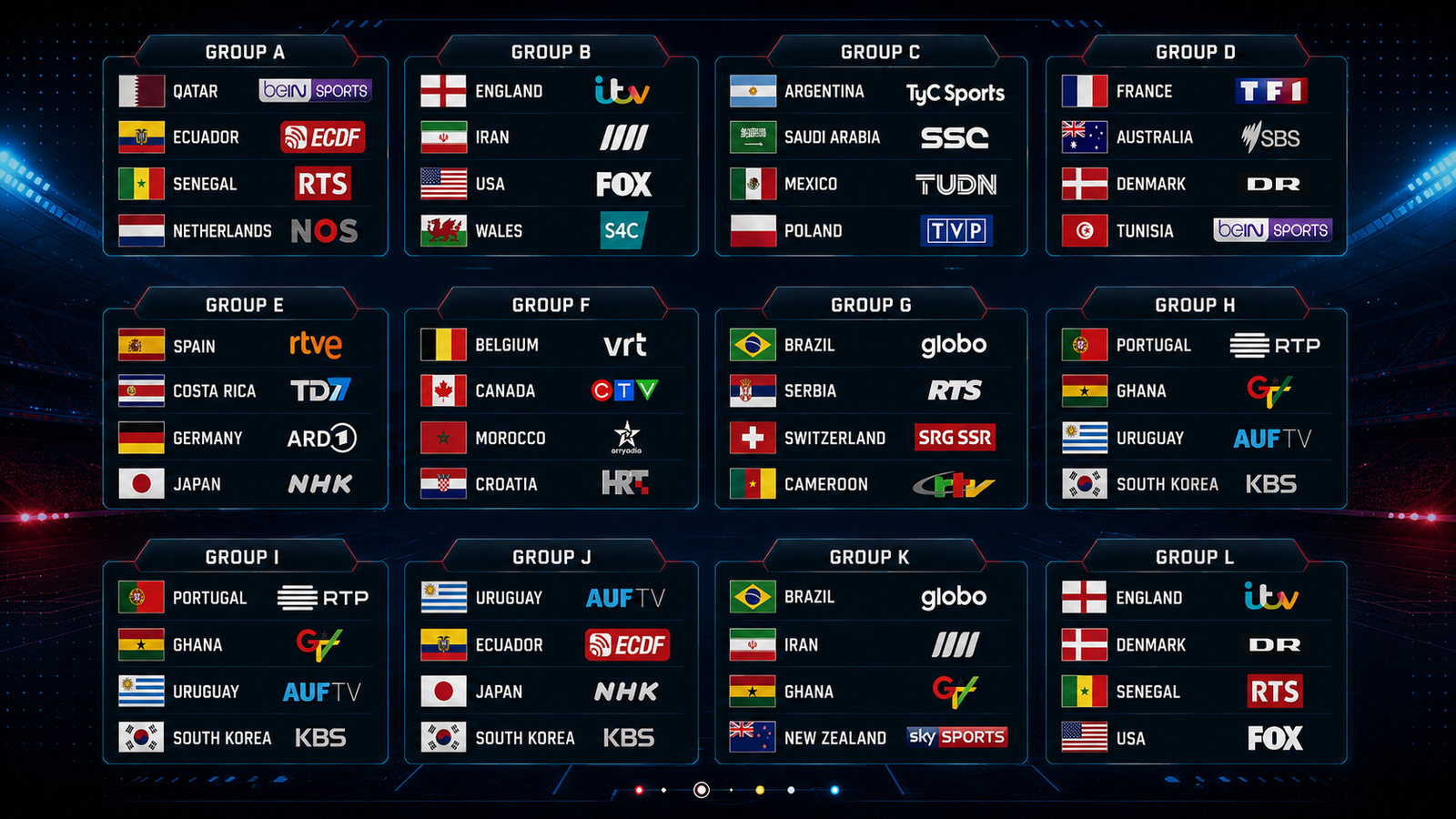
FOX, FS1, Telemundo, Universo, and related streaming apps may carry English and Spanish coverage.
TSN, CTV, and RDS are key names to check for Canadian coverage and French-language options.
BBC and ITV traditionally split World Cup coverage. Confirm current rights and local availability.
beIN Sports is the major Arabic-language broadcaster to check across the Middle East and North Africa.
Look for your national free-to-air or sports rights holder, then check whether your IPTV plan includes it legally.
When traveling, confirm whether your provider supports the same channels and whether geo-restrictions apply.
VPN use
Use a VPN for privacy and travel access, not as a shortcut around rights.
A VPN can protect your connection and may help when you travel and your legal service behaves differently outside your usual country. For live sports, speed matters most. A slow VPN can create buffering even when your IPTV provider is working.
WireGuard support, nearby servers, stable streaming speeds, and app support on your device.
Free VPNs with crowded servers, unknown privacy practices, and heavy speed loss during peak events.
Run the VPN during a live sports stream before the World Cup, then compare it with VPN off.
Buffer-free match day
Five checks that protect the big moments.
Most IPTV problems come from weak Wi-Fi, overloaded apps, wrong login details, old routers, or untested playlists.
Use Ethernet for your main TV
A wired connection reduces latency and Wi-Fi interference during high-action match moments.
Upgrade weak Wi-Fi
If you cannot use Ethernet, use Wi-Fi 6 or a strong 5 GHz signal near the device.
Choose the right IPTV player
TiviMate, IPTV Smarters Pro, VLC, Kodi, and GSE Smart IPTV can all work well when configured correctly.
Check speed by quality
Plan for at least 15 Mbps for HD, 25 Mbps or more for 4K, and much higher headroom for 8K-capable streams.
Keep a backup path
Have another app, official broadcaster app, or support contact ready before knockout matches begin.
Why M3UXtream
Built for fans who want the match, not the troubleshooting session.
M3UXtream gives football fans a practical IPTV setup path: M3U Playlist support, Xtream Codes support, sports channel categories, Smart TV and TV Stick compatibility, and WhatsApp help when the app or device needs attention.
The advantage is not only the channel list. It is the ability to test before the tournament, fix the setup, and know where your World Cup channels live before the whistle.
FAQ
IPTV World Cup 2026 questions before you subscribe.
Can I use IPTV for World Cup 2026?
Yes, IPTV can be used on compatible devices and apps. You are responsible for making sure the channels and content you access are legal and licensed in your country.
How many World Cup 2026 matches are there?
FIFA World Cup 2026 has 104 matches. The tournament includes a group stage, Round of 32, Round of 16, quarter-finals, semi-finals, third-place match, and final.
When does World Cup 2026 start and end?
The opening match is scheduled for June 11, 2026, and the final is scheduled for July 19, 2026.
What is better for World Cup streaming: M3U or Xtream Codes?
Both can work. M3U is a playlist link and is widely supported. Xtream Codes are often easier for app navigation because you enter server URL, username, and password.
Which device is best for live sports IPTV?
Smart TV, Fire TV Stick 4K, Android TV, PC, and Mac are all good choices. The best device is the one you test before match day with your exact app and internet connection.
What internet speed do I need?
Use at least 15 Mbps for HD and 25 Mbps or more for 4K. If several people use the same connection, choose higher bandwidth and use Ethernet where possible.
Does M3UXtream offer a 24H test?
Yes. You can request a 24H test on WhatsApp to check channels, app compatibility, and stream quality before choosing a longer plan.
Final whistle starts before kickoff
Do not wait until the first match to learn your IPTV setup is broken.
Start the 24H test, open your World Cup channels, confirm your app, and fix problems before the tournament begins.